🎯 Overview
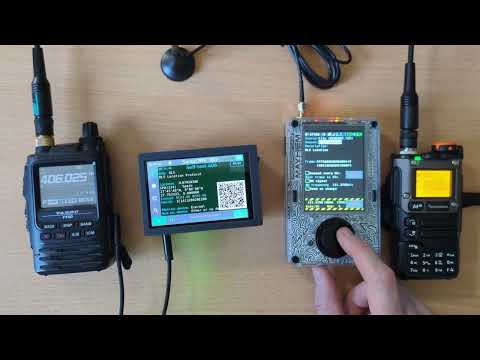
EPIRB TX application simulates an ELT/EPIRB/PLB COSPAS/SARSAT emergency beacon.
📡 Beacons
COSPAS/SARSAT emergency beacons are used in boats (EPIRB), planes (ELT) or by individuals (PLB) to facilitate Search And Rescue (SAR) missions by helping to locate accident sites.
This application is intended for testing COSPAS SARSAT 406 decoding devices used by HAM radio Civil Security SAR teams around the world.
There are two generation of 406 MHz beacons:
- First Generation Beacons (FGB) use a Manchester encoded BPSK signal,
- Second Generation Beacons (SGB) use DSSS-OQPSK modulation.
⚠️ Warning ⚠️
This application only transmits "Self-Test" beacon frames.
It MUST NOT be used to send real (non test) beacon data, as it could initiate a Search And Rescue alert.
🎁 Features
The application features two transmission modes:
- A 406 MHz signal (Manchester encoded BPSK for FGB or DSSS-OQPSK modulation for SGB) containing beacon data,
- A 127.5 MHz AM distress audio signal.
Beacon data can be selected from two different sources:
- A set of test beacons stored in the
BEACONS.TXTfile inEPIRBdirectory of the SD card, - A manual beacon editor integrated in the application, allowing selection of beacon type and location.
Beacon frames can be sent periodically (using the Resend checkbox) every 50 seconds (adjustable).
If AM signal checkbox is enabled, the transmission will automatically switch to 121.5 MHz AM emergency signal at the end of the BPSK/OQPSK frame.
If the Send on change checkbox is enabled, a new frame will be sent each time a beacon parameter is modified.
📶 Protocol
First Generation Beacon frame data is encoded using Manchester BPSK modulation at 400 bits per second, with a phase of ±63°, in accordance with COSPAS/SARSAT specifications. Second Generation Beacon frame data is encoded using OQPSK* at 300 bits per second with DSSS spreading.
📻 Baseband
A dedicated proc_epirb_tx baseband processor is used for:
- BPSK/OQPSK data transmission,
- AM emergency signal generation.
The 121.5 MHz AM emergency signal is an audio signal using a 3Hz frequency sweep from 300 Hz to 1600 Hz reproducing the typical ELT distress sound.
❓ User Guide
📝 Beacon Editor Mode
|
|
Manual (Editor) mode: - Select beacon type ( ELT / EPIRB / PLB)- Select location protocol ( Standard / User / National)- Select beacon format ( FGB / SGB)- Select beacon country - Enable Internal checkbox to indicate that the beacon uses an internal positioning device- Set beacon location using Maidenhead Locator or the Map View( Set pos. button)
|
🗺️ Map View
|
Map View: - In Manual mode, beacon location can be set using the Set pos. button- Map View is then displayed to allow beacon location adjustment - Edit coordinates or move the cursor on the map - Press the OK button to validate coordinates and return to the main screen |
📄 Beacon File Mode
|
|
File (BEACONS.TXT) mode:- Select a beacon from the samples stored in EPIRB/BEACONS.TXT file on the SD card- Enable Slideshow checkbox to have the application automatically move to the next beacon in BEACONS.TXT file after each sendBEACONS.TXT file format:- 3-columns CSV file using ; as separator- Lines starting with # are treaed as commentsColumns: -1. Beacon title (displayed in the UI Options list) -2. Beacon description (displayed in the UI description field) -3. Beacon data, as: o a 36-character hexadecimal string (2 HEX characters per byte), including FFFED0 synchronization header for FGB formato a 63-character hexadecimal string (250 bits, padded right) for SGB format |
📡 Transmission block
|
|
Transmission controls: - Enable Resend every xx s. checkbox to periodically retransmit the frame- Adjust the resend period using the delay value - Enable AM signal checkbox to transmit the 121 MHz emergency signal between frames- Set the emergency signal frequency using the AM frequency input (Manual channel)- Enable Send on change checkbox to automatically retransmit when frame content is modified- Use the Start/Stop button to activate/deactivate the beacon simulation- Use AM chan to select the channel for AM signal- Use BPSK chan to select the channel for BPSK/OQPSK signal |
📻 Transmitter View
|
|
This is the generic PortaPack Transmitter view, used to configure: - BPSK/OQPSK transmission frequency (Manual channel) - Frequency step - Transmitter bandwidth (N/A in this direct IQ PSK mod. scheme) - Transmitter GAIN-TX dB control ,step 1 dB , (0 to +47 dB) - Transmitter RF-AMP gain , OFF-ON , (0 or +14 dB) |